Application Rationalization: A Practical Guide for Business Owners
Application rationalization means deciding which apps to keep, merge, replace or retire. Here is a step-by-step method, scoring criteria and pitfalls to avoid.

Application Rationalization: A Practical Guide for Business Owners
Application rationalization is the process of reviewing every application your business pays for and deciding, one by one, whether to keep it, improve it, consolidate it with another, replace it or retire it. The goal is simple: fewer overlapping tools, lower cost, less risk, and a stack that supports how you actually earn money. This guide shows how to run it in a small or mid-sized company without a six-figure tooling project.
Raremindraremind.coMake Your Tools Work for RevenueRaremind’s Money Map identifies lost revenue, excessive costs and process inefficiencies, starting with how your business earns money.Explore Raremind’s approach
TL;DR
Application rationalization is a structured keep, modernize, consolidate, replace or retire decision for every app, based on business value, technical fit, cost and risk.
Start with an inventory that names an owner, a cost and a business purpose for each app. Without that, scoring is guesswork.
Map dependencies before you switch anything off. Skipping this step is how savings turn into outages.
Treat it as a recurring habit, not a one-off cleanup. Portfolios drift back to sprawl within a year or two.
Begin with the revenue process, not the software list. The apps that matter are the ones touching the money.
Table of Contents
What application rationalization actually means
Why small and mid-sized businesses end up with too many apps
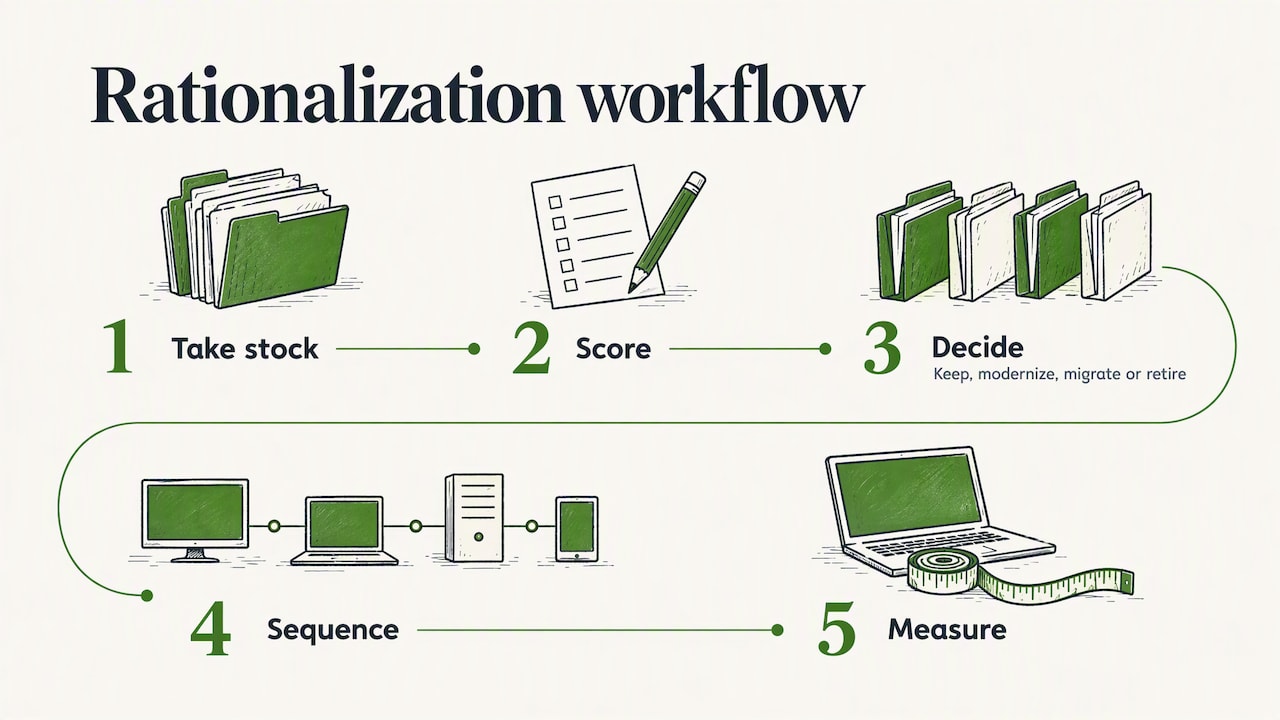
A five-step method that works without an enterprise team
Where process mining fits
Perspective: start with the money, not the software list
Common mistakes to avoid
How we help
Sources
What application rationalization actually means
The definition is straightforward. Application rationalization assesses each application’s functional and technical fit, cost and strategic value, then decides whether to keep, modernize, migrate or retire it. Done well, it cuts cost, removes redundancy and improves efficiency.
The U.S. federal government has run this exercise at scale. Its Application Rationalization Playbook notes that the work uncovers duplicated applications, siloed business units and unnecessary IT cost. Those three symptoms show up in small companies too, just with fewer zeros: two project tools, three e-signature subscriptions, a CRM nobody trusts and a spreadsheet that quietly does the real work.
You may see the same idea called software rationalization, tech stack rationalization or application portfolio rationalization. The label changes with the audience. The method is the same: take stock, score, decide, sequence, measure.
Rationalization versus optimization
The two terms are often mixed up. Forrester’s analysts describe application optimization as a continuous, outcomes-driven discipline, while rationalization is typically a discrete initiative to find applications for retirement, consolidation, remediation and cost reduction. Their advice is to embed portfolio decisions in ongoing governance owned jointly by business and technology leaders.
For a company with 10 to 200 people, the practical reading is this: run a focused rationalization once, then keep a light review rhythm so you never need a big one again.
Why small and mid-sized businesses end up with too many apps
Sprawl rarely comes from a bad decision. It comes from many reasonable ones. A sales lead buys a tool to fix a follow-up problem. Finance adds a second tool because the first did not export properly. A founder signs up for a free trial that turned into an annual plan. Each purchase solved a real problem on the day it was made.
The damage shows up later:
Duplicate spend. Several tools do 80% of the same job, and each renews automatically.
Manual glue. People copy data between systems, which creates errors and delays in quoting, invoicing and reporting.
Security exposure. Forgotten apps keep access to customer data long after anyone uses them.
Slow decisions. Nobody can answer a basic question such as “which system is the source of truth for customers?”
This is why we argue that a tool list is the wrong place to start. A list tells you what you own. It does not tell you what is leaking revenue.
A five-step method that works without an enterprise team
Step 1: Build the inventory
An application inventory is a catalog of applications and their details, such as business capabilities, owners and technology stacks. It is critical for informed decisions. For a smaller business, a spreadsheet is enough if every row carries the same fields:
Field | What to record |
|---|---|
Application | Name, vendor, plan or tier |
Business owner | One named person, not a team |
Purpose | The process it supports (quoting, billing, onboarding) |
Annual cost | License, add-ons, integrations, admin time |
Users | Paid seats versus people who logged in recently |
Data | What customer or financial data it holds |
Contract | Renewal date and notice period |
Connections | Which other systems feed it or read from it |
Pull the cost column from your accounting system and corporate cards, not from memory. Teams reliably find subscriptions nobody remembered.
Academic work on portfolio management makes a useful point here: organizations often start with an inventory, but delivering value also requires strategy and governance, inventory management, and reporting and rationalization capabilities. A clean spreadsheet is the start, not the result.
Step 2: Score each application
The U.S. federal playbook recommends weighing business value, technical fitness and total cost of ownership, plus risk factors such as cybersecurity vulnerabilities and contract life cycles. Translated for a smaller business:
Business value: How critical is it to revenue or delivery? How many people use it? Does it match your current goals?
Technical fit: Is it supported and secure? Does it connect to your other systems, or does it need manual workarounds?
Total cost: Subscription plus integrations, training, admin time and the cost of errors it causes.
Risk: Vendor stability, contract lock-in, security gaps, key-person dependency.
Practitioner guidance lists key portfolio health metrics such as total cost of ownership, business criticality, technical health, redundancy rate, user adoption and vendor support status. You do not need all of them. Pick four or five, score each app from 1 to 5, and keep the scale the same across the whole list.
The International Foundation for Information Technology argues that decisions should be prioritized by business impact, not technical preference. The biggest opportunities sit where high business value meets poor technical fit, high cost or elevated risk. In plain terms: look first at the important app that is expensive or fragile, not the cheap tool someone dislikes.
Step 3: Pick a disposition for each app
Every application ends up in one of a few buckets:
Decision | When it fits | Example |
|---|---|---|
Retain | High value, good fit, fair cost | Your accounting system |
Improve | Right tool, poorly configured or underused | A CRM with half the fields empty |
Consolidate | Two or more tools overlap | Three note-taking and task tools |
Replace | Low fit, but the need is real | A legacy quoting spreadsheet |
Retire | Low value, little use | A trial that became an annual plan |
Larger organizations add technical options such as rehost, replatform and refactor. These matter when rationalization is the first step of a cloud migration, when the choices include retire, rehost, replatform, refactor or reimagine. If you are heading that way, a portfolio-first legacy modernization approach shows how rationalization results can steer which systems to move and which to leave alone. For API-heavy systems, API modernization without a big bang describes a gradual alternative to wholesale rewrites.
Step 4: Map dependencies and sequence the changes
This is the step most small teams skip. An app that looks unused may feed a monthly report, trigger an invoice or hold the only copy of customer history. Guidance on portfolio practice warns that skipping dependency mapping can turn potential savings into expensive, unplanned production outages.
The federal playbook’s approach is to use dependency maps to sequence retirement, starting with leaf nodes: systems that nothing else depends on. Switch those off first, learn from the process, then move toward the connected core.
A simple sequence for a small business:
Retire unused tools with no connections and no stored customer data.
Consolidate overlapping tools that have one clear survivor.
Replace or rebuild the systems that sit in the middle of your revenue process, one at a time, with a rollback plan.
Leave the most connected systems for last.
Step 5: Measure and keep it alive
Results need defined success metrics: financial savings, ticket volume, error rates and the time people spend on manual rework. The playbook says agencies must routinely and continuously update and rationalize their portfolios as technology and business conditions change.
To avoid the “stale spreadsheet” problem, practitioners suggest quarterly portfolio reviews and monthly progress checks. Governance works when it defines clear decision rights and scales review depth to risk. It fails when it becomes a review ritual. A new tool under a set cost threshold should need one named approver, not a committee.
Where process mining fits
Inventories tell you what exists. They do not show how work flows through those apps. That is where process mining helps: these tools read event logs from your systems to show how orders, invoices or tickets really move, where they loop back, wait or get handled by hand. Apps that sit at the center of rework are candidates for fixing or replacing. Apps that appear nowhere in the real flow are candidates for retirement.
If you are comparing process mining tools, judge them on questions that matter to a business your size:
Data connection. How easily does it pull logs from the systems you already run? One comparison of two leading platforms found that one offers real-time streaming ingestion and large-scale data processing, while the other offers built-in industry benchmarking and cross-process dependency mapping.
Scope. Some suites cover analysis, modeling, governance and collaboration in one package. The SAP Signavio suite, for example, bundles process insights, intelligence, modeling and governance modules. Others focus on mining with an AI layer on top.
Cost model. Pricing varies a lot. One leading vendor says pricing depends on the nature and scale of the process mining needs and offers a free plan to start. Another vendor lists process mining from $4,250 per month for SaaS, while a general automation platform includes process and task mining from $15 per user per month on its premium plan.
Fit with your size. A tool built for global enterprises can cost more in setup time than it returns for a 50-person company.
For most small and mid-sized businesses, the honest answer is that a mining tool is optional. A day mapping the revenue process by hand, with the people who do the work, often exposes the same gaps at a fraction of the cost. Buy tooling when the volume of transactions is high enough that nobody can trace the flow manually.
Perspective: start with the money, not the software list
Most rationalization projects begin with the question “which tools do we have?” We begin one step earlier: “how does this business make money, and where does it leak?”
That changes the outcome. A tool list rewards cutting the cheapest subscriptions, which saves little. A revenue-first view finds the quote that takes four days because it crosses three systems, the invoices that go out late because data is retyped, and the renewals nobody tracks. The savings there are larger, and the tool decisions follow from them.
We also keep our advice independent. We do not sell software and we take no vendor commissions, so when the answer is “fix the process and keep what you have,” we can say so. Often the best rationalization is a smaller change than the business expected. For more on that mindset, see our view on when AI belongs in strategy and our cost reduction guide for small businesses.
— Mirko
Common mistakes to avoid
Cutting by price. The cheapest apps are rarely the problem. Cost per app matters less than cost of the process around it.
No named owner. An app without an owner is never retired and never improved.
Ignoring shadow IT. Tools bought on personal or team cards will not appear in procurement records. Check card statements and single sign-on logs.
Forgetting contract dates. Missing a notice period locks in another year. Record renewal dates in the inventory.
Replacing before understanding. A new platform on top of a broken process just moves the problem. Our AI readiness assessment article shows how to map revenue workflows before buying tools.
Treating it as a one-off. Without a review rhythm, the sprawl returns.
Some vendors publish large figures for what structured programs can deliver. One platform vendor reports customers achieving $50M in savings and 30% fewer unnecessary support costs within six months. Those are vendor-reported results from large programs, so use them as a sign that the lever is real, not as a forecast for your business.
How we help
If you want an independent view without taking on a tooling project, our plan, Your Digital & AI Office, is a flat monthly retainer at €995 per month. We map how your business makes money with our Money Map, find revenue leaks and redundant tools, advise on automation and AI, and help you decide what to keep, merge or drop. Larger, hands-on initiatives are scoped separately as projects.

You can see how it works on Your Digital & AI Office, or read how we compare with traditional consulting first.
FAQ
What is the difference between application rationalization and application optimization?
Rationalization is a defined initiative to decide which applications to keep, consolidate, replace or retire. Optimization is the continuing discipline of managing the portfolio against business priorities. In practice, you run rationalization first, then keep optimizing through regular reviews.
How long does application rationalization take?
That depends on how many applications you run and how well you know them. A small business with a clean spreadsheet can often finish the inventory and scoring in a few weeks, while retirements follow contract renewal dates. Plan the review cycle around those dates so cuts line up with notice periods.
Do I need special software to rationalize my applications?
Not at the start. A shared spreadsheet with owners, costs, users and renewal dates covers most small portfolios. Dedicated portfolio or process mining tools make sense when you have many systems or high transaction volumes that cannot be traced by hand.
What should I retire first?
Start with applications that have low usage, no connections to other systems and no stored customer data. These carry the least risk and give you a quick, visible saving. Leave heavily connected systems until you have mapped their dependencies.
Sources
Introducing the Application Rationalization Use Case, SAP Learning
Turn Application Portfolio Rationalization Into a Continuous Optimization Capability, Forrester
What is application rationalization and how to make it a reality, Google Cloud
Developments in Practice XXXIV: Application Portfolio Management, AIS
Application Portfolio Management: What It Is and How to Run It, Catio
Prioritize rationalization decisions by business impact, IF4IT
Application Portfolio Management & Rationalization Guide, Archilu